透明寄りでパンチのあるピーク処理。ドラム、ループ、プリマスターに。
Version 0.9.0 Demo / Windows 11専用
Cobalt Clipper Neo
クラブミュージック向けに作った、VST3 / CLAP対応のサチュレーション&クリッパープラグインです。 DriveとCharacterだけでなく、CeilingとMixまで使って、迫力、密度、倍音、歪みの混ざり方を素早く作れます。
デモ版は起動から30分間使用でき、Saveも可能です。30分経過すると無音になるので、再度使用する場合はプラグインを立ち上げなおしてください。
Version 0.9.0 Demo / Windows 11 only
Cobalt Clipper Neo
A VST3 / CLAP saturation and clipping plugin made for club and electronic music production. Shape impact, density, harmonics, and parallel-style blend with Type, Drive, Character, Ceiling, and Mix.
The demo version can be used for 30 minutes from launch, and Save is available. After 30 minutes, audio becomes silent; reload the plugin to use it again.
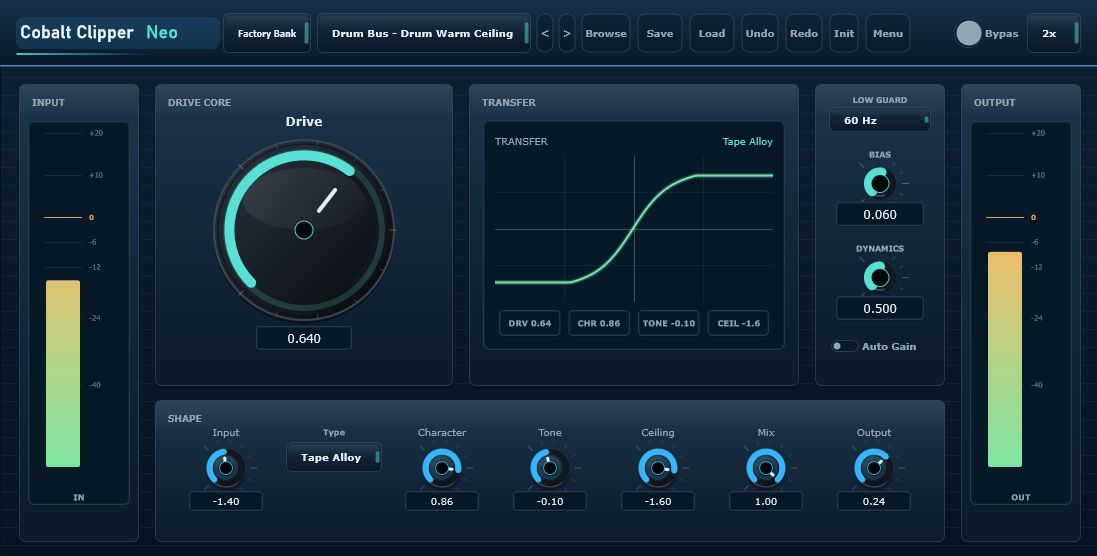
Interface
音作りを前に出す、1画面GUI
Type、Drive、Character、Tone、Ceiling、Mix、Outputを一画面で操作できます。下段の音作りパラメーターを積極的に使うことで、ただ音を潰すだけでなく、好みのサチュレーション量と質感に追い込めます。
Interface
A focused one-screen workflow
Type, Drive, Character, Tone, Ceiling, Mix, and Output are always close at hand. The lower sound-shaping controls are meant to be used actively, not treated as utility afterthoughts.
Features
5つのサチュレーションタイプ
Steel Clip、Cobalt Lift、Club Heat、Bass Forge、Tape Alloyを切り替え、ドラム、808、ベース、シンセ、ミックスバス、プリマスターまで対応します。
Features
Five saturation types
Switch between Steel Clip, Cobalt Lift, Club Heat, Bass Forge, and Tape Alloy for drums, 808s, bass, synths, mix buses, and pre-master clipping.
密度、前進感、知覚ラウドネスを足すモード。リードやシンセに。
温かく荒い非対称サチュレーション。パラレル歪みにも有効。
808やサブベース向け。低域を守りながら中域倍音を生成。
丸み、まとまり、軽い圧縮感を作るバス向けglue saturation。
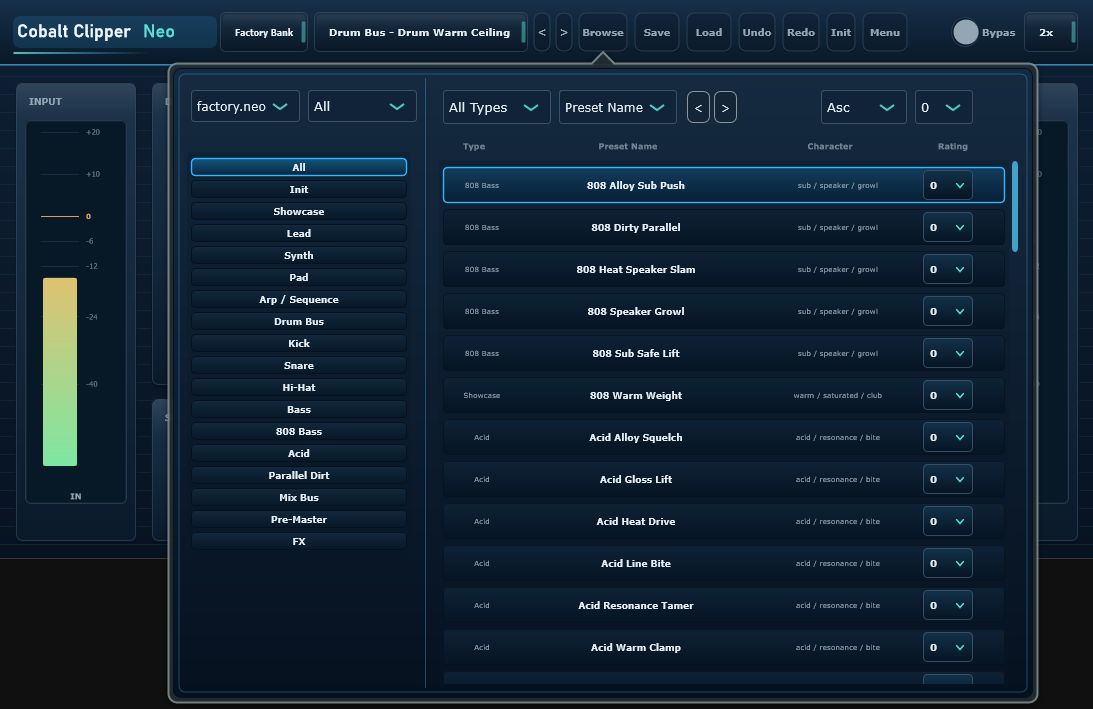
Preset Browser
カテゴリから素早くプリセットを選択
Init、Showcase、Drum Bus、Kick、808 Bass、Acid、Parallel Dirtなどのカテゴリで探せます。レーティングと並べ替えで、よく使うプリセットに戻りやすい構成です。
Preset Browser
Find presets by category
Browse categories such as Init, Showcase, Drum Bus, Kick, 808 Bass, Acid, and Parallel Dirt. Rating and sorting controls help you return to useful presets quickly.
How to use
Driveだけで終わらせない
まずサチュレーションの方向性を決めます。透明、密度、Heat、Bass、Tape系のどれを狙うかを選びます。
Driveで強さを決め、Characterで歪み方、丸み、密度、倍音の出方を調整します。
Ceilingを下げるとクリッパーへの当たり方が変わります。迫力や密度を出す重要なコントロールです。
100%だけでなく70-95%付近も試すと、原音のアタックを残しながらサチュレーションの厚みを足せます。
How to use
Do not stop at Drive
Pick the saturation direction first: clean clipping, density, heat, bass harmonics, or tape-like glue.
Drive sets intensity. Character changes how the signal bends, thickens, softens, or growls.
Lowering Ceiling changes how hard the signal hits the clipper. It is a key control for density and impact.
Try 70-95%, not only 100%. This keeps transient punch while adding saturated weight.
System / Demo
Windows 11専用
System / Demo
Windows 11 only
対応OS: Windows 11専用。Mac版はありません。
形式: VST3 / CLAP
デモ制限: 起動から30分後に無音になります。立ち上げなおすと再度使用できます。
Save: デモ版でも可能です。
Audio Demo
SoundCloudで音を確認
デモ音源や今後の比較サンプルはSoundCloudで公開予定です。
Audio Demo
Listen on SoundCloud
Audio demos and future comparison examples will be shared on SoundCloud.
Cobalt Series
関連ページ
Cobalt Series
Related pages
Version Log
更新履歴
Windows 11向けVST3/CLAPデモ版。5タイプのサチュレーション、プリセットブラウザ、日英マニュアル、30分デモ制限を含む初回公開候補です。
音源デモ、追加プリセット、より詳しい使用例の整備を予定しています。
Version Log
Release notes
Windows 11 VST3/CLAP demo build with five saturation types, preset browser, Japanese/English manuals, and a 30-minute demo limitation.
Planned work includes audio demos, more presets, and expanded usage examples.